
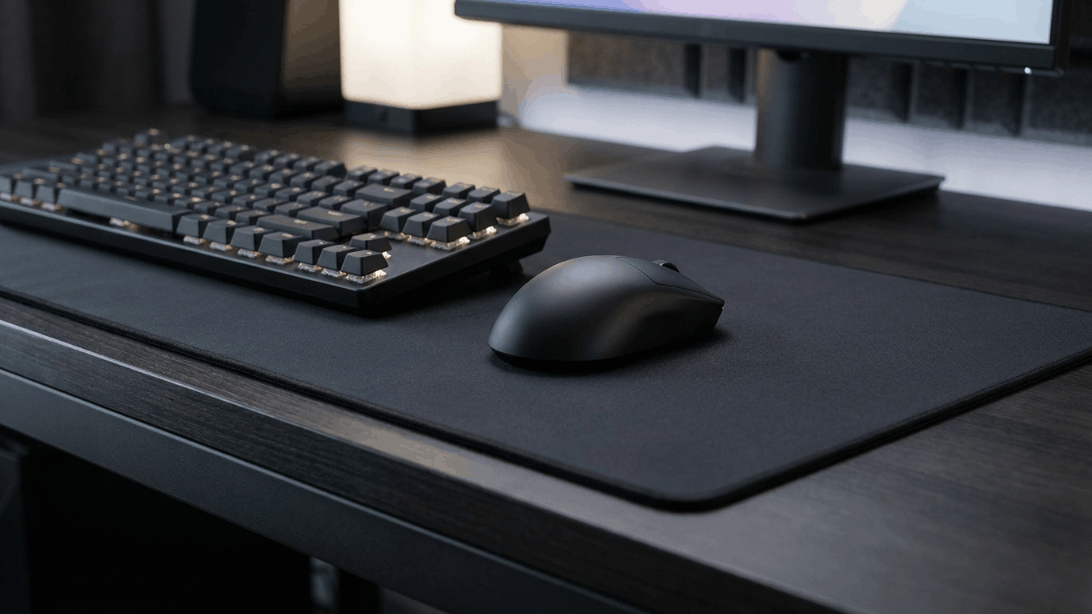
The Logitech G PRO X SUPERLIGHT 2 is a lightweight wireless gaming mouse designed for competitive players who want speed, precision and a simple, performance-focused shape.
The mouse weighs just 60 grams and combines Logitech’s HERO 2 sensor with LIGHTSPEED wireless connectivity, LIGHTFORCE hybrid switches and PTFE feet. Logitech rates the sensor for up to 44,000 DPI, more than 888 IPS tracking speed and over 88G acceleration.
Unlike many gaming mice that add numerous buttons and elaborate features, the PRO X SUPERLIGHT 2 keeps things relatively simple with five buttons.
That minimalist approach makes sense for competitive FPS gaming, where low weight, consistent tracking and a familiar shape can matter more than having a large number of programmable controls.
The mouse also supports Logitech’s LIGHTSPEED wireless technology with up to 8,000Hz polling, while its battery is rated for up to 95 hours of constant motion.
Quick Verdict
The Logitech G PRO X SUPERLIGHT 2 is an excellent choice for gamers who want a lightweight, high-performance wireless mouse without unnecessary complexity.
Its 60g design, HERO 2 sensor and LIGHTSPEED wireless system give it a strong foundation for competitive gaming. The 8,000Hz maximum report rate is also available for users who want extremely high polling performance.
The five-button layout is deliberately simple. That’s an advantage for FPS players but can be a disadvantage for MMO or productivity users who want many additional controls.
Battery life is another major strength. Logitech rates it at up to 95 hours, although actual battery life will vary depending on usage and settings.
Best For
Competitive FPS gaming
Esports-focused players
Lightweight-mouse enthusiasts
Claw and palm/claw users
Gamers who prefer simple layouts
Wireless gaming
Main Strength
Extremely light 60g design combined with a high-performance sensor and wireless system.
Main Weakness
Only five buttons, which limits its usefulness for MMO and shortcut-heavy workflows.
Key Specifications
Specification Logitech G PRO X SUPERLIGHT 2
Product Type Wireless Gaming Mouse
Weight 60g
Height 125mm
Width 63.5mm
Depth 40mm
Sensor HERO 2
DPI Range 100–44,000 DPI
Max Tracking Speed >888 IPS
Max Acceleration >88G
Switches LIGHTFORCE Hybrid
Buttons 5
Wireless LIGHTSPEED
Maximum Report Rate 8,000Hz
Wired Connection USB-C
Battery Up to 95 hours
Feet Zero-additive PTFE
Onboard Memory Yes
Software Logitech G HUB
Compatibility Windows 10 or later
Warranty 2-Year Limited Hardware Warranty
These specifications are from Logitech’s official product documentation.
Design and Build Quality
The defining feature of the PRO X SUPERLIGHT 2 is its 60g weight.
Logitech has designed the mouse around the idea that reducing unnecessary weight can make rapid mouse movements easier, particularly in competitive games.
The dimensions are:
125mm height
63.5mm width
40mm depth
and the total weight is 60g.
The shape is relatively simple and symmetrical-looking rather than aggressively ergonomic.
That makes it suitable for gamers who prefer a familiar shape and don’t need a large number of side controls.
Real-World Takeaway
If you regularly make fast, low-sensitivity mouse movements, the low weight can be a major advantage.
If you prefer a heavier mouse with more physical presence, however, the Superlight 2 may initially feel unusually light.
Shape and Grip
Mouse shape is highly personal.
The PRO X SUPERLIGHT 2 is designed around a relatively straightforward shape that accommodates several common grip styles.
It can work particularly well for:
Palm grip
Claw grip
Fingertip grip
However, the best grip ultimately depends on hand size and personal preference.
Important Buying Advice
Don’t choose a mouse only because its specifications look impressive.
A 60g mouse with the wrong shape for your hand can be less comfortable than a heavier mouse with a better ergonomic fit.
HERO 2 Sensor
The HERO 2 sensor is one of the mouse’s most important components.
Logitech specifies:
100–44,000 DPI
with maximum tracking performance of more than:
888 IPS
and:
88G acceleration.
The sensor also uses zero smoothing, acceleration and filtering according to Logitech’s specifications.
What Does That Mean?
For normal gaming, you are unlikely to need anything close to 44,000 DPI.
Most competitive players use substantially lower sensitivity.
The important point is not the maximum DPI number itself.
The important things are:
Consistent tracking
Low latency
Accurate movement
Reliable sensor behavior
And that’s where the HERO 2 is designed to excel.
Gaming Performance
The PRO X SUPERLIGHT 2 is primarily aimed at competitive gaming.
Its combination of:
60g weight + HERO 2 + LIGHTSPEED + high polling rate
is particularly well suited to fast-paced games.
It makes sense for:
Counter-Strike
Valorant
Overwatch
Fortnite
Apex Legends
Call of Duty
Other competitive FPS games
The lightweight construction can make rapid directional changes easier, while the sensor is designed for precise tracking.
FPS Gaming
This is where the mouse makes the most sense.
Players who use low sensitivity and large mouse movements can benefit from having less weight to move across the mousepad.
Polling Rate
One of the major upgrades in the PRO X SUPERLIGHT 2 is its support for an up to 8,000Hz report rate. Logitech lists 8,000Hz as the maximum report rate for the mouse.
A higher polling rate means the mouse can report its position to the computer more frequently.
Why Does It Matter?
At:
1,000Hz: approximately 1ms reporting interval
At:
8,000Hz: approximately 0.125ms reporting interval
The difference is most relevant to competitive players using high-refresh-rate displays and systems capable of handling the additional processing workload.
Important
You should not expect an automatic dramatic improvement in gameplay simply by switching from 1,000Hz to 8,000Hz.
Your monitor, PC performance, game engine and sensitivity all matter.
LIGHTSPEED Wireless
Logitech’s LIGHTSPEED wireless technology is designed specifically for low-latency gaming.
The PRO X SUPERLIGHT 2 supports LIGHTSPEED wireless and can operate at up to 8,000Hz report rate.
The wireless receiver connects to the computer through USB.
Logitech also includes a receiver extension adapter in the box, which can help position the receiver closer to the mouse.
Our Takeaway
For competitive gaming, LIGHTSPEED is the connection mode you should use.
The advantage of the Superlight 2 is that you don’t have to choose between:
Wireless convenience
and
Competitive gaming performance.
LIGHTFORCE Hybrid Switches
The PRO X SUPERLIGHT 2 uses Logitech’s LIGHTFORCE hybrid switches.
These combine optical sensing technology with a mechanical-style feel. Logitech says the switches are designed to combine the speed and reliability of optical switching with the familiar feel of traditional mechanical microswitches.
Logitech lists the switches as rated for 70 million clicks.
Why This Matters
Traditional mechanical mouse switches can eventually develop issues such as double-clicking.
Optical switching can help address some of those mechanical-contact limitations.
At the same time, Logitech has tried to preserve the tactile experience users expect from a conventional mouse switch.
Click Feel
The Superlight 2’s click experience is designed to retain a familiar mechanical feel while using LIGHTFORCE technology.
For competitive gaming, the important characteristics are:
Consistent actuation
Reliable clicks
Fast response
Predictable feedback
The mouse’s five-button design also keeps the control layout simple.
Side Buttons
The mouse includes two side buttons in addition to the primary left/right buttons and scroll wheel click, giving it five total buttons. Logitech confirms the five-button configuration in its official specifications.
This is enough for most FPS players.
However, MMO players may find the button count restrictive.
For games that require many abilities or shortcuts, a mouse with 8–12+ programmable buttons would be more appropriate.
Scroll Wheel
The center scroll wheel provides the expected functions for:
Scrolling
Weapon selection
Navigation
Middle-click actions
The minimalist approach is intentional.
The Superlight 2 is designed more around competitive precision than productivity-oriented controls.
Battery Life
Battery life is another major strength.
Logitech rates the PRO X SUPERLIGHT 2 for up to 95 hours of constant motion.
Actual runtime can vary depending on:
Polling rate
Usage
Wireless behavior
Settings
Firmware
Other operating conditions
Real-World Takeaway
The rated battery capacity is strong enough that most users should not need to charge the mouse every day.
USB-C Charging
The mouse uses a USB-C charging/data cable, which is a welcome feature for a modern gaming mouse. Logitech includes the cable and wireless receiver in the box.
USB-C also means you can continue using the mouse while it is connected by cable.
PTFE Mouse Feet
The PRO X SUPERLIGHT 2 uses zero-additive PTFE feet.
These are designed to provide a smooth glide across a compatible mouse surface. Logitech lists the PTFE feet as part of the mouse’s technical specifications.
For competitive gaming, the mouse feet are important because a smooth and predictable glide can make low-sensitivity aiming easier.
Logitech G HUB Software
Advanced features require Logitech G HUB software. Logitech specifically notes this in its product specifications.
G HUB allows users to manage supported Logitech gaming hardware and configure features such as:
DPI
Button assignments
Polling rate
Profiles
Onboard memory
Other supported settings
This makes the mouse considerably more customizable than a basic plug-and-play wireless mouse.
Onboard Memory
The PRO X SUPERLIGHT 2 includes onboard memory.
This is useful if you want your preferred configuration to remain available without relying on the same software setup every time.
For competitive gamers who move between systems, onboard profiles can be particularly useful.
Compatibility
Logitech lists compatibility with:
Windows 10 or later
and requires a USB 2.0 port for the wireless receiver. Logitech also notes internet access for G HUB software.
For the exact current product listing used in this review, Logitech’s US specification page emphasizes Windows compatibility.
In the Box
The package includes:
PRO X SUPERLIGHT 2 mouse
LIGHTSPEED wireless adapter
USB-A to USB-C charging/data cable
Adapter extension
Optional grip tape
Optional aperture door with PTFE foot
Documentation
Logitech lists these accessories on its official product page.
The included grip tape can be useful for players who want additional surface traction.
Customization
The PRO X SUPERLIGHT 2 isn’t designed as a heavily customizable enthusiast mouse.
Instead, customization focuses on performance.
You can configure:
DPI
Button assignments
Profiles
Polling rate
Other supported G HUB settings
The onboard memory also makes it possible to retain configurations on the mouse.
Pros and Cons
Pros
Extremely lightweight 60g design
HERO 2 sensor
Up to 44,000 DPI
More than 888 IPS tracking capability
Up to 88G acceleration
Up to 8,000Hz report rate
Reliable LIGHTSPEED wireless
LIGHTFORCE hybrid switches
Up to 95 hours battery life
USB-C charging
PTFE feet
Onboard memory
Optional grip tape
Strong fit for competitive FPS gaming
Cons
Only five buttons
Not ideal for MMO players
Shape may not suit every hand
8,000Hz polling is more useful for enthusiast/competitive users than casual gamers
Advanced features require G HUB software
Lightweight design may feel too light for users who prefer heavier mice
Who Should Buy the Logitech G PRO X SUPERLIGHT 2?
🎮 Competitive FPS Players
This is the mouse’s primary audience.
Its low weight, precise sensor and low-latency wireless connection make it particularly attractive for competitive shooters.
🏆 Esports Players
The mouse is designed around Logitech’s PRO Series philosophy and has been developed with input from professional esports players.
🖱️ Lightweight-Mouse Fans
If you specifically want a 60g mouse, the Superlight 2 deserves serious consideration.
💻 Everyday Gamers
It also works well for general PC gaming, even if you don’t play competitively.
Who Should NOT Buy It?
The PRO X SUPERLIGHT 2 isn’t the best choice if:
You need many programmable buttons.
You primarily play MMOs.
You prefer a very ergonomic right-handed shape.
You prefer a heavier mouse.
You don’t care about high-end gaming performance.
You want extensive RGB lighting.
For these users, a different mouse may be a better fit.
Best Alternatives
Logitech G PRO X SUPERLIGHT 2 DEX
The DEX uses the same 60g class and HERO 2/LIGHTSPEED platform but has an asymmetrical right-handed design, making it worth considering for users who want a more ergonomic shape.
Razer Viper V3 Pro
A strong alternative for competitive players looking for another lightweight esports-focused mouse.
Razer DeathAdder V3 Pro
Better suited to gamers who prefer a more pronounced ergonomic right-handed shape.
Logitech G PRO X SUPERLIGHT
The previous-generation Superlight remains relevant for users who don’t need the newer Superlight 2 features. Logitech lists its older HERO sensor at up to 25,600 DPI and battery life around 70 hours.
Final Verdict
Our Verdict
The Logitech G PRO X SUPERLIGHT 2 is a focused gaming mouse that prioritizes the things competitive players care about most.
Its 60g weight, HERO 2 sensor, LIGHTSPEED wireless connection, LIGHTFORCE switches and high polling-rate support give it a strong performance foundation.
The mouse doesn’t try to become an all-purpose productivity controller. Instead, it keeps the button count low and concentrates on movement, tracking and responsiveness.
That makes it especially compelling for FPS players.
The biggest limitation is also related to this philosophy: five buttons simply aren’t enough for users who want lots of shortcuts or MMO abilities.
Best For
Competitive gaming and FPS players
Main Strength
60g lightweight design with high-end sensor and wireless performance
Main Weakness
Limited button count
Our Recommendation
Yes — the Logitech G PRO X SUPERLIGHT 2 is an excellent choice for gamers who prioritize lightweight performance, accurate tracking and low-latency wireless connectivity over extra buttons and features.
Quick Buying Advice
Before choosing the PRO X SUPERLIGHT 2, consider:
Your hand size
Your preferred grip style
Whether 60g feels comfortable to you
Whether you need more than five buttons
Whether you actually need 8,000Hz polling
Whether your PC supports your desired polling configuration
Whether you prefer a symmetrical or ergonomic shape
Whether you want RGB lighting
The biggest decision isn’t actually DPI.
It’s whether the shape, weight and button layout suit your hand and games.
Frequently Asked Questions
Is the Logitech G PRO X SUPERLIGHT 2 good for gaming?
Yes. It is specifically designed as a high-performance wireless gaming mouse, with a 60g weight, HERO 2 sensor and LIGHTSPEED wireless connectivity.
Is the PRO X SUPERLIGHT 2 good for FPS games?
Yes. Its low weight, precise sensor and five-button layout make it particularly suitable for competitive FPS gaming.
How much does the PRO X SUPERLIGHT 2 weigh?
The mouse weighs 60 grams.
What sensor does it use?
It uses Logitech’s HERO 2 sensor.
What is the maximum DPI?
Logitech specifies a range of 100 to 44,000 DPI.
Does the PRO X SUPERLIGHT 2 support 8000Hz polling?
Yes. Logitech lists a maximum report rate of 8,000Hz.
How long does the battery last?
Logitech rates the battery for up to 95 hours of constant motion. Actual battery life varies with usage conditions.
Does it use USB-C?
Yes. The mouse uses USB-C for charging/data.
Does it have RGB lighting?
The PRO X SUPERLIGHT 2 is focused on performance and does not use RGB lighting as a major feature.
How many buttons does it have?
It has five buttons in total.
Is it good for MMO gaming?
It can work for MMO gaming, but its five-button design isn’t ideal if you need many programmable controls.
Is the PRO X SUPERLIGHT 2 worth considering for productivity?
Yes, particularly if you prefer a lightweight mouse, but users who need many shortcut buttons may be better served by a productivity-focused mouse.
Final Recommendation
The Logitech G PRO X SUPERLIGHT 2 is best understood as a competitive gaming mouse first and an everyday mouse second.
If your priorities are:
Low Weight → Accurate Tracking → Wireless Performance → Low Latency → Competitive Gaming
then this mouse deserves a place on your shortlist.
If your priorities are:
Many Buttons → MMO Controls → Ergonomic Productivity → Extensive RGB
then another mouse may suit you better.